



Building a Flutter app looks simple on the surface. Write once. Run everywhere. But real-world products rarely behave that neatly. Performance bottlenecks, scaling issues, and messy state management often surface once users grow and features expand. The difference between a stable app and a fragile one lies in architectural discipline.
Flutter apps demand more than fast UI delivery. They require predictable data flow, clear separation of logic, and codebases that stay readable under pressure. Poor structure slows feature releases, increases bug cycles, and raises long-term maintenance costs. Architecture decides whether your product evolves smoothly or turns into technical debt.
For entrepreneurs and CEOs planning a Flutter app, these decisions shape timelines, budgets, and product stability. Clean structuring patterns like Flutter Bloc clean architecture help teams control complexity early. They support faster iteration, easier testing, and scalability without constant rewrites. This foundation keeps your app business-ready as user demand grows.
What is Flutter BLoC Architecture?
BLoC stands for Business Logic Component. It is an architectural pattern used in Flutter for managing the flow of data, state, and business logic in an application. It provides a structured way to separate the presentation layer (UI) from the business logic layer. As a result, this helps in developing more maintainable, testable, and scalable apps. BLoC architecture Flutter is often used to create reactive and high-performance applications.
Overview of Flutter BLoC Architecture
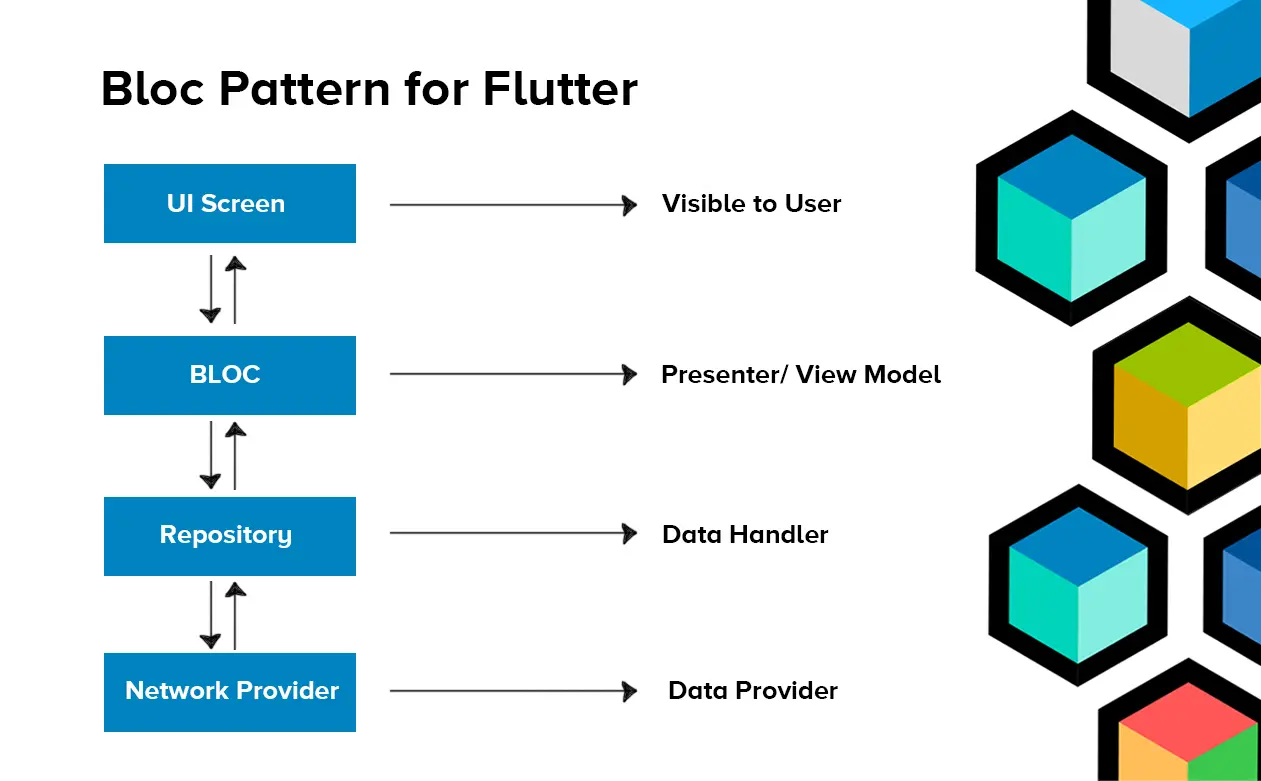
Image Source: Tops Technologies
The above diagram presents a structured view of the Flutter BLoC architecture and the interaction between its core layers. The UI Screen represents the presentation layer that users directly interact with. The BLoC layer works as the central controller, managing events and state transitions while separating business logic from the interface. Beneath it, the Repository layer acts as the data handler, abstracting data sources and coordinating information flow. The Network Provider functions as the data provider, handling API requests and external services. This layered architecture in Flutter ensures controlled state management, improved scalability, and clean separation of concerns, which are essential for building high-performance mobile applications.
To better understand how each layer contributes to efficient Flutter app development, let’s break down the key components in detail below.
Key Components of Flutter BLoC Architecture
Bloc Flutter architecture is particularly well-suited for managing complex and asynchronous data flow in Flutter applications. It enables developers to maintain a clear separation of concerns. This, as a consequence, makes code easier to maintain, extend, and debug.
Using BLoC, you can build high-performance mobile apps that respond efficiently to user interactions. Top companies highly focus on including this feature in their Flutter app development services. But to leverage this feature, you must have an essential understanding of the key components and concepts of Flutter BLoC architecture:
1. Business Logic
The core logic and functionality of the Flutter application reside within BLoCs. It contains tasks like data fetching, transformation, validation, and any other operations that aren’t directly related to the UI. By isolating business logic, it becomes easier for Flutter developers to reuse and test.
2. Events
In BLoC, developers can initiate changes or actions by sending events to the BLoC. Events are essentially user interactions or triggers, such as button clicks, text input, or network requests. These Events represent what should happen next in your app. Thus, it helps in creating intelligent algorithms in the app.
3. States
BLoC emits states in response to events. These States represent the different snapshots or states of your application’s UI and data. Each state represents a specific view, and changes in state trigger UI updates.
4. Streams and Sinks
BLoC uses the concept of streams and sinks to handle asynchronous data flow. Events are added to a sink and the BLoC emits states through a stream. Consequently, this allows for real-time updates and reactivity in your app.
5. StreamBuilder
In the Flutter UI layer, developers generally use a ‘StreamBuilder’ widget to listen to the stream of states emitted by the BLoC. This widget automatically rebuilds the UI when new states are emitted. So, it ensures that the user interface reflects the current application state.
6. Dependency Injection
To keep BLoCs decoupled and testable, dependency injection is used to provide external dependencies. This includes data repositories or services, to the BLoCs. Popular dependency injection libraries like get_it or provider are commonly used in conjunction with BLoC.
7. Testing
Clean architecture Flutter BLoC also supports testing. You can write unit tests for your BLoC logic to ensure that it behaves as expected, independently of the UI. Additionally, you can perform widget tests and integration tests to verify how BLoCs interact with the UI.
Benefits of Flutter BLoC Architecture
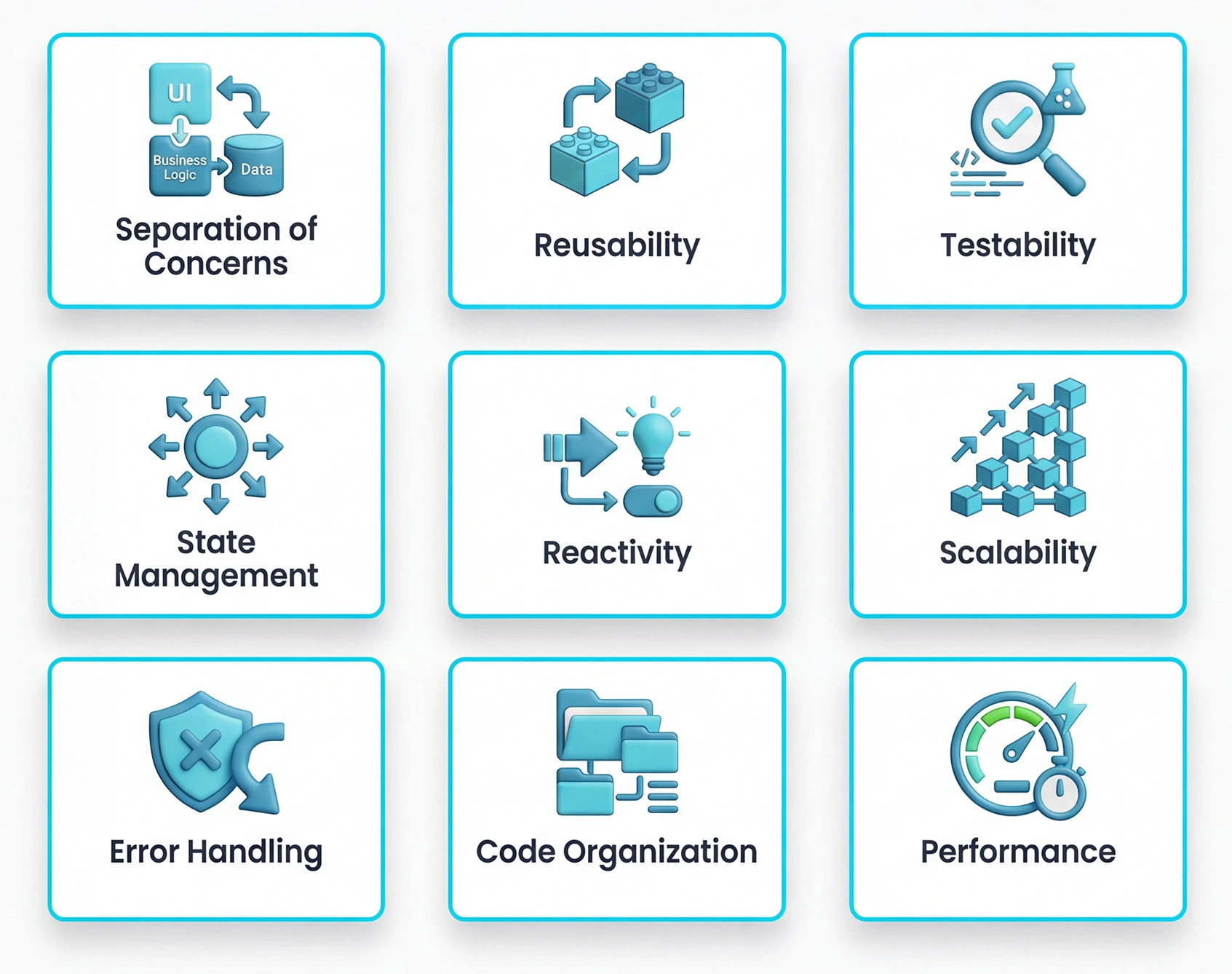
BLoC is a highly useful programming pattern in Flutter application development. It offers plenty of benefits in terms of maintainability, testability, reusability, and scalability. By using BLoC architecture in Flutter, developers get a structured and efficient way to manage state and business logic in applications. So, let us explore the prominent advantages of using the bloc architecture for Flutter development:
1. Separation of Concerns
BLoC enforces a clear separation of concerns by isolating the business logic from the presentation layer (UI). This separation makes the codebase more modular and easier to understand. As a result, developers can work on the UI and business logic independently, which enhances code maintainability and collaboration.
2. Reusability
BLoC architecture promotes the reuse of business logic across different parts of a Flutter application or even across multiple projects. Once you create a BLoC for a specific feature or functionality, you can implement it elsewhere without duplicating code. This structured reusability reduces development effort, shortens delivery timelines, and helps optimize overall Flutter app development cost by minimizing redundant engineering work.
3. Testability
Flutter architecture BLoC simplifies unit testing. You can write tests for the business logic (BLoC) in isolation without needing to interact with the UI layer. This makes it easier to verify that your business logic behaves as expected. Hence, it becomes easier to catch issues early in the app development process.
4. State Management
This architecture excels at managing the application state. It allows developers to represent different states of the app (e.g., loading, error, success) as distinct objects. So, it becomes easier to handle state transitions and update the UI accordingly. Thus, BLoC enables the app to offer a more responsive and reliable user experience.
5. Reactivity
BLoC leverages streams and sinks to manage asynchronous data flow. This reactive programming approach enables real-time updates in the UI whenever the underlying data changes. Hence, it ensures that your app remains responsive and provides users with immediate feedback.
6. Scalability
BLoC architecture strengthens app scalability by allowing new features to be added and existing ones to expand without creating codebase complexity. Its structured state management approach keeps the application modular and organized as the product grows. This scalability aligns well with evolving Flutter app development trends, where apps are expected to adapt quickly to changing user demands and market requirements.
7. Error Handling
Implement robust error handling within your BLoCs. Your Flutter application should manage failures by emitting clear error states and displaying meaningful messages to users. Use the catchError method on streams to capture and control runtime issues before they affect the user experience. When you hire app developers with strong BLoC expertise, error handling becomes systematic, predictable, and easier to maintain across complex workflows.
8. Code Organization
This architecture follows a structured and organized codebase. Each feature or functionality can have its dedicated BLoC. It means making it easier to locate and manage code related to specific parts of your app. This code organization also assists in simplifying code navigation and debugging.
9. Performance
BLoC can contribute to enhanced app performance. By efficiently managing state and asynchronous operations, BLoC can help reduce unnecessary re-renders of UI components. As a result, it enables the Flutter app to offer a smoother and more efficient user experience.

How to Use BLoC Architecture in Flutter to Build Apps?
As we discussed implementing the BLoC (Business Logic Component) architecture in Flutter offers several advantages. With the BLoC programming pattern, your Flutter application gets fast-performance abilities and a smoother user experience. But to ensure that your Flutter app is efficient and responsive, you need to implement these best BLoC practices during development.
1. Optimize Business Logic
Try to keep your business logic in BLoC classes lightweight and efficient. Avoid computationally expensive operations on the main thread. Offload time-consuming tasks (e.g., network requests, database operations) to background isolates or dedicated compute threads using libraries like ‘compute’ or ‘Isolate’. You can also minimize the frequency of emitting state changes. Only update the UI when necessary to avoid unnecessary widget rebuilds.
2. Use StreamControllers Wisely
Be cautious with the use of ‘StreamController’. Make sure to close the controller when it’s no longer needed to prevent resource leaks. Consider using ‘BehaviorSubject’ from the ‘rxdar’ package if you need to provide the latest value to new subscribers, even if events have already been dispatched.
3. Efficiently Manage UI Updates
You should utilize the StreamBuilder widget efficiently. Try to avoid wrapping large parts of the UI in StreamBuilder when only a small portion of the UI depends on the BLoC’s state.
Use ‘const’ constructors for widgets that don’t depend on the BLoC’s state to optimize widget rebuilds.
4. Minimize Widget Rebuilds
Use the ‘Equatable’ package to optimize state comparison. This helps Flutter determine when widgets need rebuilding. Implement the ‘==‘ operator for your state classes to make state comparison more efficient.
5. Lazy Loading and Caching
Implement lazy loading for data that doesn’t need to be loaded immediately. Fetch data on-demand as the user interacts with the app. Top-notch app development company also use caching mechanisms to store frequently accessed data locally. As a result, this will help in reducing the need for repeated network requests.
6. Handle Errors Gracefully
Implement robust error handling within your BLoCs. Your Flutter application should be able to handle errors gracefully by emitting error states and displaying appropriate error messages to users. For this, you should use the ‘catchError’ method on streams to capture and handle errors.
7. Memory Management
Dispose of your BLoCs when they are no longer needed to prevent memory leaks. Dispose of controllers and cancel asynchronous operations. And also avoid excessive object creation and destruction, especially within tight loops.
8. Optimize Network Requests
You should focus on implementing efficient network request handling. Try to use connection pools, caching, and batch requests where applicable to reduce network overhead. Enforce paginated loading for large datasets. This will avoid loading all data at once.
9. Performance Profiling
Use Flutter’s performance profiling tools, such as the DevTools suite, to identify and resolve performance bottlenecks within your application. Test and profile your Flutter app across different devices, operating systems, and screen sizes to maintain consistent responsiveness. Many successful Flutter app examples follow this disciplined profiling approach to ensure smooth user experiences and reliable performance at scale.
10. Testing and Benchmarking
Write comprehensive unit tests for your BLoC logic to catch performance issues early in development. Consider benchmarking your app to identify potential areas where performance improvements are needed.

11. Use Dart’s Asynchronous Programming Features
Leverage Dart’s asynchronous programming features like async/await and Future to write clean and efficient asynchronous code. When combined with Flutter BLoC clean architecture, this approach helps separate business logic from UI layers. Thus, improving performance, maintainability, and overall development efficiency for high-performance Flutter apps.
12. Stay Up-to-date
The Flutter ecosystem is continually evolving. Flutter always brings updates and improvements to enhance its development ability. Therefore, you should stay up-to-date with Flutter and BLoC-related updates, particularly when there are new packages and best Flutter app development practices. However, partnering with an experienced React Native app development company can also help teams stay informed about cross-framework innovations and adopt the best architectural patterns across both Flutter and React Native ecosystems.

Conclusion
Flutter BLoC architecture is a smart approach to efficient programming. It empowers developers with various capabilities to enhance the quality and performance of the Flutter app. Flutter framework is usually popular for building beautiful and responsive UIs for mobile apps.
However, achieving high-quality functionalities and performance in the Flutter app requires an additional approach. And this is where BLoC comes in which allows you to maximize Flutter’s potential to build a compelling and fast-performing app. But to implement it successfully, you need to reach out to a recognized Flutter app development company who possess good experience in deploying BLoC patterns.
Since RipenApps has been using Flutter for years, our team know well how to proficiently use the BLoC and other programming techniques to build cutting-edge apps. If you have an innovative app concept, we can help you turn it into a high-performance app with Flutter.

FAQs
Q1. What is Flutter BLoC architecture, and why is it used?
Flutter BLoC (Business Logic Component) is a design pattern that separates UI from business logic. It improves code maintainability, testability, and performance by managing state predictably. Therefore, making it ideal for scalable mobile apps.
Q2. How does BLoC improve app performance in Flutter?
BLoC reduces unnecessary widget rebuilds by reacting only to relevant state changes. This results in smoother UI updates, reduced resource usage, and a more responsive user experience, especially in high-performance Flutter apps.
Q3. When should I choose BLoC over other Flutter state management solutions?
Choose BLoC when building large, complex applications that need clear separation of logic and UI. It’s particularly beneficial when multiple developers work on the same codebase and consistency and scalability are priorities.
Q4. Does BLoC architecture increase development speed?
Initially, BLoC may take longer to set up than simpler state managers, but it speeds up long-term development by reducing bugs, simplifying testing, and making feature additions more predictable.
Q5. Can beginners use Flutter BLoC architecture easily?
While BLoC has a learning curve, beginners can adopt it with proper examples and documentation. Once understood, it provides a structured way to manage app state that scales well as the app grows.
Q6. Will using BLoC architecture make my Flutter app more testable?
Yes. Because BLoC separates UI from business logic, developers can write unit tests and integration tests for logic without interference from the UI layer, improving reliability and code quality.

SHARE
WRITTEN BY

Prankur Haldiya
Chief Technical Officer
A tech innovator and engineering leader, Prankur Haldiya drives RipenApps’ product development strategy and oversees cutting-edge solutions in mobility, AI, and cloud ecosystems. He is passionate about building high-performance teams and helping brands launch secure, scalable, and user-centric digital products.
View All Articles






 India
India USA
USA Australia
 Canada
 UK
UK UAE
UAE