

Many businesses try to stay ahead in the competitive app store market, which has a total of 38 billion annual app downloads. However, creating iOS apps is just a start; most apps have a lower user retention, and businesses often have a problem keeping their end users engaged.
As per the Business of Apps report, the average retention rate sharply decreases to 3.7% after a month, from the launch day itself. These statistics highlight the need to decide between the SwiftUI vs UIKit frameworks and carefully consider one of these to offer users highly engaging user experiences.
The two Apple UI frameworks, SwiftUI and UIKit, help businesses to build seamless, responsive, and highly intuitive user interfaces. These frameworks help you attract user downloads but also foster a long-term connection with your targeted user base.
Choosing the right UI framework is a crucial aspect, but should you choose SwiftUI or UIKit for your iOS app? This blog will explore these two UI frameworks, providing a side-by-side detailed comparison, advantages, and limitations of each: SwiftUI and UIKit.
Table of Contents
What is UIKit?
UIKit is the traditional imperative framework for building user interfaces and elements of an iOS app. The term “imperative” here means that your development teams write code in a step-by-step command sequence, which changes the program’s state.
It was launched in 2008 by Apple, and since then, it has provided a set of pre-built APIs and UI components. This helps your development teams to make a more powerful and responsive UI for the mobile app.
UIKit offers core features that help you build a dynamic user interface, which results in higher user engagement. Let’s discuss the UIKit’s core features in brief:
- View Controller component that manages app navigation.
- Auto Layout system that helps you create a responsive layout according to the device’s size.
- Smooth Animations that provide enhanced user experiences.
Advantages and Limitations of UIKit
UIKit is one of the robust iOS development frameworks. Although it offers major advantages, it also comes with certain challenges. Let’s look at the advantages and limitations of UIKit that will help you get started:
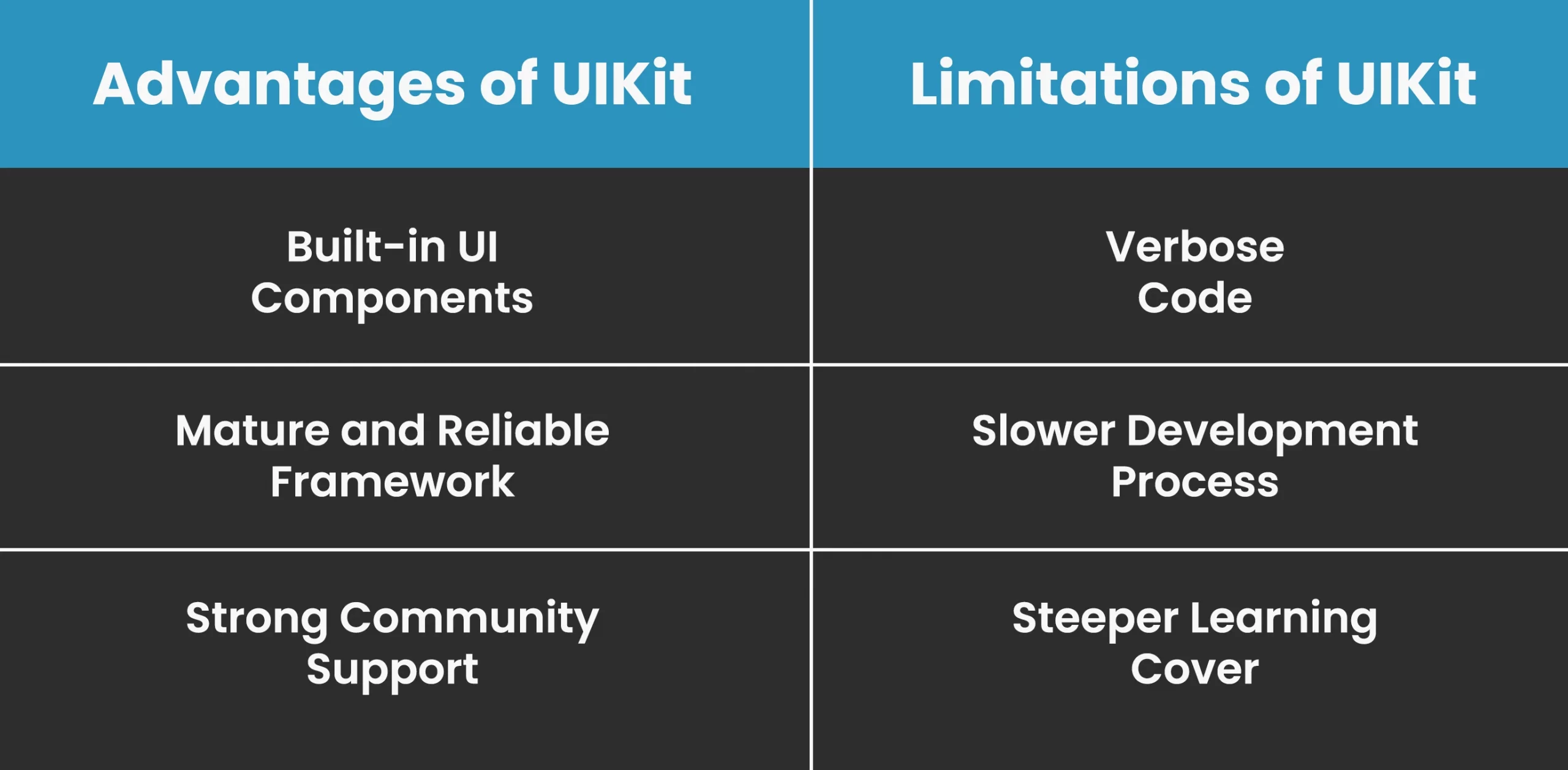
Advantages of UIKit
1. Built-in UI Components
It offers a wide variety of pre-built APIs and UI elements that you can use instantly. You can use these ready-to-use components without starting from scratch. Some of the in-built UI elements include buttons, fields, text, navigation bars, etc.
2. Mature and Reliable Framework
UIKit is Apple’s oldest framework, which makes it a trusted and reliable framework choice for custom iOS app development building future-ready apps. With its maturity and consistent environment, you can ensure stable performance and high compatibility across various iOS versions.
3. Strong Community Support
It has an extensive community support that helps you in the long run. This is because, with a strong community of experienced developers, you can have easy access to learning tutorials, courses, and documentation. This will help you learn the UIKit framework and also resolve issues that occur quickly.
Limitations of UIKit
1. Verbose Code
With UIKit’s imperative programming approach, you need to define UI elements and manage their state changes in a step-by-step sequence. This leads to repetitive and lengthy codebases.
2. Slower Development Process
It has a slower development process as you need to create and update layouts manually, which takes additional time, and this results in delayed project delivery.
3. Steeper Learning Cover
It has a steeper learning curve as you need to understand concepts like view controllers and delegates to create the overall UI design approach.
What is SwiftUI?
When comparing the two UI frameworks, UIKit vs SwiftUI, the latter is a relatively new framework and is considered the best UI framework for iOS apps. Developed by Apple and built using one of the top iOS app development languages, that is, Swift, it enables you to create responsive yet intuitive UI layouts. This is done with the help of SwiftUI’s declarative syntax.
With its wide range of built-in core features, such as state management, data binding, and views and layouts, you can leverage reactive programming principles. This means that whenever a change occurs, the UI gets automatically updated, eliminating the need for manual checks and updates by the development teams.
To build scalable and high-performing UIs with SwiftUI, consider collaborating with a mobile app development company in New York. They can help you build apps aligned with the modern app development trends.
Advantages and Limitations of SwiftUI
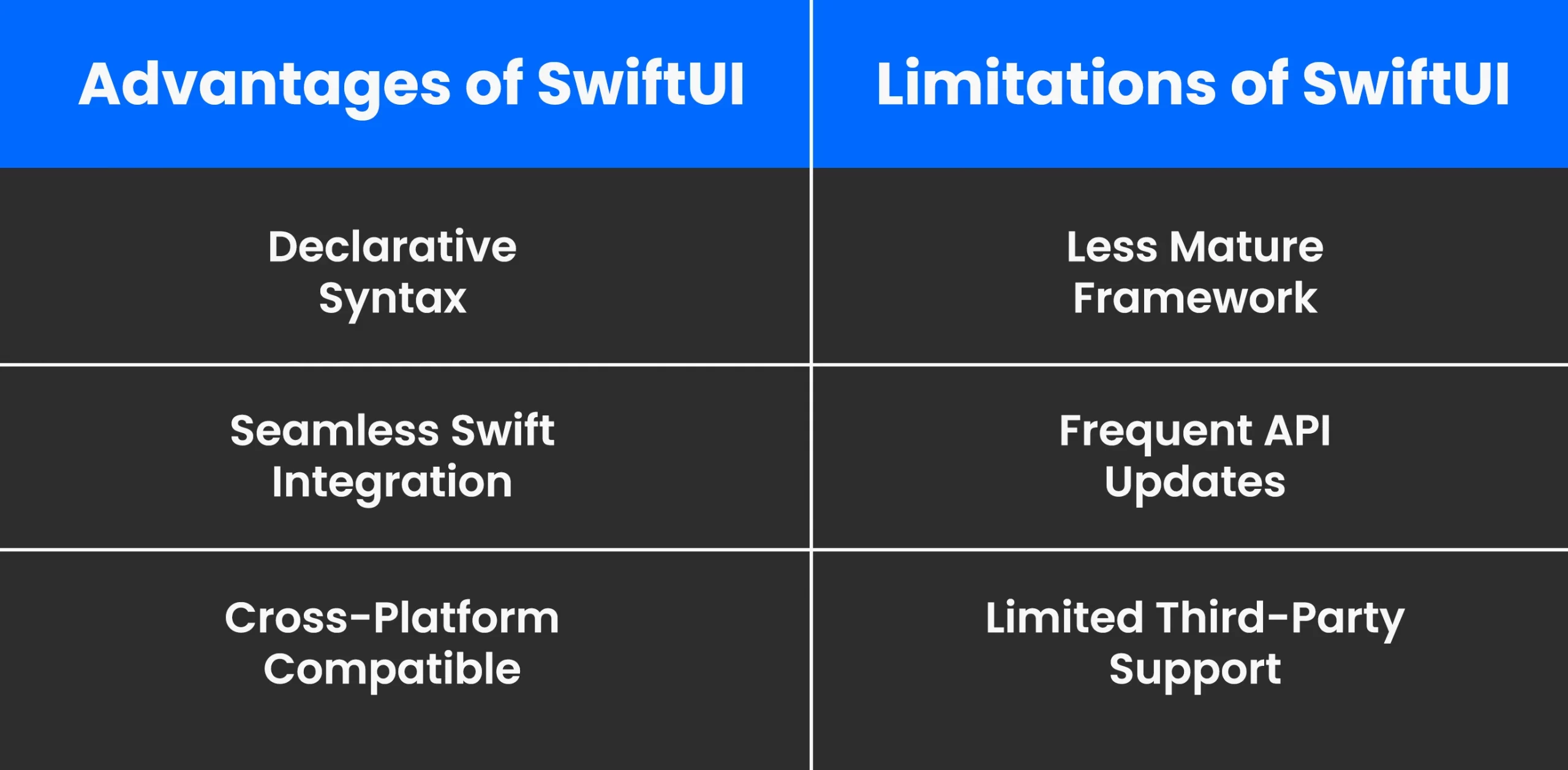
Let’s explore the SwiftUI’s advantages and limitations to help you know which one is the right fit for your project between, SwiftUI vs UIKit:
1. Declarative Syntax
When it comes to choosing between the two UI frameworks, SwiftUI vs UIKit, SwiftUI uses a declarative programming approach. This means that you don’t need to write the step-by-step commands as UIKit’s method. It leads to a cleaner and readable codebase, which leads to faster UI development.
2. Seamless Swift Integration
It offers a smooth integration with the Swift programming language via native frameworks and APIs, and Xcode integration. This ensures a better app’s performance and enhances your end user base’s experiences. By partnering with the best software development company, you can leverage Swift integration while building high-performing and scalable iOS apps.
3. Cross-Platform Compatible
Another major advantage of using SwiftUI is its cross-platform compatibility. This helps you create a single codebase and support multiple platforms from it, leading to reduced development time and effort.
Read Also: Top 15 New Swift 5 Features to Use in iOS App Development
Limitations of SwiftUI
1. Less Mature Framework
It is a relatively new UI framework when compared to UIKit. Therefore, it lacks some advanced features and customization options.
2. Frequent API Updates
With its API ecosystem frequently changing, it can lead to compatibility issues. This is why, using SwiftUI, you need to stay aligned with modern app development trends and the latest versions.
3. Limited Third-Party Support
It is still growing, and it has fewer third-party libraries, tools, and resources available. This leads to some critical iOS app development challenges when creating advanced user interfaces.
SwiftUI vs UIKit for iOS App Development: A Detailed Comparison
Here is a SwiftUI vs UIKit, iOS UI frameworks guide comparison to help you understand the difference between the two Apple UI frameworks:
| Feature | SwiftUI | UIKit |
| Launch Year | 2019 | 2008 |
| Language Used | Swift | Swift and Objective-C |
| Device Compatibility | iOS 13 onwards | iOS 9 onwards |
| Built-in Live Preview Support | Yes | Not available, need to leverage Xcode previews |
| Dark Mode Support | Automatic, no manual configuration | Manual configuration is required |
| Learning Curve | Easy for developers who are already familiar with the Swift Programming language | A steeper learning curve due to many complex UI concepts |
| Coding Style | Declarative style- you need to use views as a state function and declare what the UI should look like using the same state | Imperative style- you need to create and manage UI elements in a sequence (step-by-step commands) |
| UI Components | Fewer but growing UI ecosystem | A comprehensive set of pre-built UI components |
| Performance and Speed | Provides a modern and clean code method that helps you efficiently build UIs with less boilerplate code | Highly optimized for building complex UI, but slower due to its manual setup behavior |
| Maintenance | Easy maintenance due to its modular and clean code approach | It uses verbose and lengthy codebases that require a higher level of management |
| Development Cost | Lower due to a faster UI development approach | Higher, as longer coding and maintenance time increases the cost |
Now that you have understood the major differences between SwiftUI and UIKit, it’s clear that each framework has its own development style and method of creating UI layouts. Although both of these Apple UI frameworks are designed to build engaging user interfaces, their approach differs, and choosing between the two depends on your unique purpose. Moreover, to have a correct app development roadmap, you should consider leveraging mobile app development services in USA.
Let’s look at the core features from the table in more detail to understand the two UI frameworks:
1. Device Compatibility
Since UIKit is the oldest and foundational UI framework, it basically covers all the iOS versions, starting from iOS 9. On the other hand, SwiftUI can support devices from iOS 13 and above. However, according to recent Apple iOS adoption statistics, about 88 % of iOS devices run on iOS 18 or higher, making SwiftUI as compatible as the UIKit framework.
2. Coding Style
Leveraging iOS app development services helps you build faster and reliable UI features for your user interface. But for an efficient app development process, you need to have a consistent coding style, as it directly impacts the end user base experience. Let’s look at the different coding paradigms of both the UI frameworks:
When comparing SwiftUI vs UIKit, the former has a declarative syntax. It allows you to define the state for a given UI element, and it comes with less boilerplate code and manual adjustments. Whereas, UIKit works on a step-by-step sequence programming style, known as an imperative programming method. This leads to more manual management and ultimately a slower development process.
3. Performance And Speed
In the two Apple UI frameworks comparison, SwiftUI vs UIKit, the latter has a mature ecosystem that helps your development teams to deliver apps that come with higher performance and better memory management systems. This is an ideal choice for building complex iOS apps as it will help you efficiently build every ui interaction with maximum responsiveness.
On the other hand, SwiftUI comes with reactive data binding, which helps you automatically update the UI whenever a state or any function changes. However, it has some performance issues when creating advanced customized UIs.
If you want to combine both frameworks and achieve the best performance and scalability, you can hire mobile app developers who have detailed expertise in both frameworks.
4. UI Components
Today’s users prefer apps that are built not only with visuals but also with a complete focus on consistent and responsive interfaces. For this, UIKit offers a mature set of built-in UI components and rich third-party library support.
In the SwiftUI vs UIKit comparison, SwiftUI has fewer built-in components, but they are high-performing in nature. Partnering with a UI/UX design agency will help you choose one of these and prioritize design and innovation when building an iOS app.
5. Cost Efficiency
When building an iOS app, its iOS app development cost is a crucial aspect. UIKit has a manual setup and state management, which requires more boilerplate code. This results in increased development time and also costs to maintain and update the UI layouts. Whereas, SwiftUI is a modern framework that comes with improved readability and less boilerplate code, thus lower development cost and effort.

When to Choose UIKit for Building iOS Apps?
Go with UIKit when:
- You need to build a legacy app that needs compatibility with iOS 9 device versions or later.
- You are building complex custom UIs and animations.
- You want UIs that are relevant to UIKit libraries.
When to Choose SwiftUI for Building iOS Apps?
Choose SwiftUI when:
- You plan to build UI with clean code and faster development speed.
- You prefer modern and declarative style programming for enhanced scalability.
- You are building a new app that targets iOS 13 or later versions.
If you are still unsure which framework will suit your specific project goals, it’s best to take expert advice from an iOS app development agency. They can help you choose between SwiftUI vs UIKit, as per your app’s needs or complexity.
Closing Statement
When comparing the two widely known UI frameworks, SwiftUI vs UIKit, the truth is that both are strong frameworks and can help you build efficient and scalable UIs for your iOS apps. However, the best one depends on your specific project requirements and application complexities.
SwiftUI is now a go-to framework that businesses are using for its reactive programming style. Whereas, UIKit still remains valid and powerful as it has a mature ecosystem and various built-in components. If you are planning to build future-ready and scalable iOS applications, partnering with a trusted custom mobile app development company can ensure that you meet your goals. effectively.

FAQs
Q1. What is the difference between SwiftUI and UIKit?
In the SwiftUI vs UIKit comparison, SwiftUI works with a declarative approach and provides a live preview option, which enables you to see the changes while designing UIs. In contrast to this, UIKit uses an imperative approach that helps you write step-by-step commands, and UIKit handles the rendering and updating of the interface.
Q2. Is SwiftUI better than UIKit for iOS development?
There is no better option between the two: SwiftUI and UIKit. Both come with their own benefits and are suited for different types of iOS app development projects. SwiftUI is recommended when you need to build an iOS app with a faster development speed and cost-effectiveness. In comparison, UIKit is an ideal choice for creating complex and feature-rich iOS apps that are legacy compatible.
Q3. Can SwiftUI replace UIKit completely?
No, SwiftUI can’t fully replace UIKit. While SwiftUI is rapidly growing and gaining adoption in the mobile app industry, UIKit still remains powerful and essential for many legacy projects and apps that require highly customized and complex UI elements.
Q4. Which framework offers better performance: SwiftUI or UIKit?
Performance and speed of the app vary depending on your app development requirements. UIKit provides enhanced performance for larger and complex apps, while SwiftUI offers faster development for modern apps.

SHARE
WRITTEN BY

Prankur Haldiya
Chief Technical Officer
A tech innovator and engineering leader, Prankur Haldiya drives RipenApps’ product development strategy and oversees cutting-edge solutions in mobility, AI, and cloud ecosystems. He is passionate about building high-performance teams and helping brands launch secure, scalable, and user-centric digital products.
View All Articles